You type a channel name into Social Blade and get an earnings estimate like “$250 – $4K per month.” That’s a sixteen-fold spread. Is the real number at the bottom, the top, or somewhere in between? Worse, you look up your own channel, compare it with YouTube Studio, and the two don’t agree at all.
The short answer: Social Blade’s earnings figure is a rough guess, not payout data. It takes a channel’s public view count and multiplies it by a single fixed rate of $0.25 to $4.00 per 1,000 views, and it assumes every view earns money. Because it can’t see niche, audience country, video length or even whether a channel is monetized, it runs far too low for some channels (tech, finance, US audiences) and far too high for others (Shorts, kids’ content, channels earning nothing at all). Only YouTube Studio shows real earnings, and only to the channel’s owner.
To be fair to Social Blade: for subscriber counts and view trends, it’s genuinely useful. Earnings are the part to be careful with.
How Social Blade calculates earnings
Social Blade publishes its method. It applies a low RPM of $0.25 and a high RPM of $4.00 per 1,000 views to a channel’s view counts, and it states plainly that it “assumes that every view on the channel is monetized, which is usually not the case” (Social Blade help).
So the math for a channel getting 1,000,000 views a month is:
- Low: 1,000,000 ÷ 1,000 × $0.25 = $250
- High: 1,000,000 ÷ 1,000 × $4.00 = $4,000
That’s the entire calculation. The high end is 16 times the low end, because $4.00 ÷ $0.25 = 16. A range that wide isn’t a prediction — it’s a way of saying “somewhere in this neighborhood.”
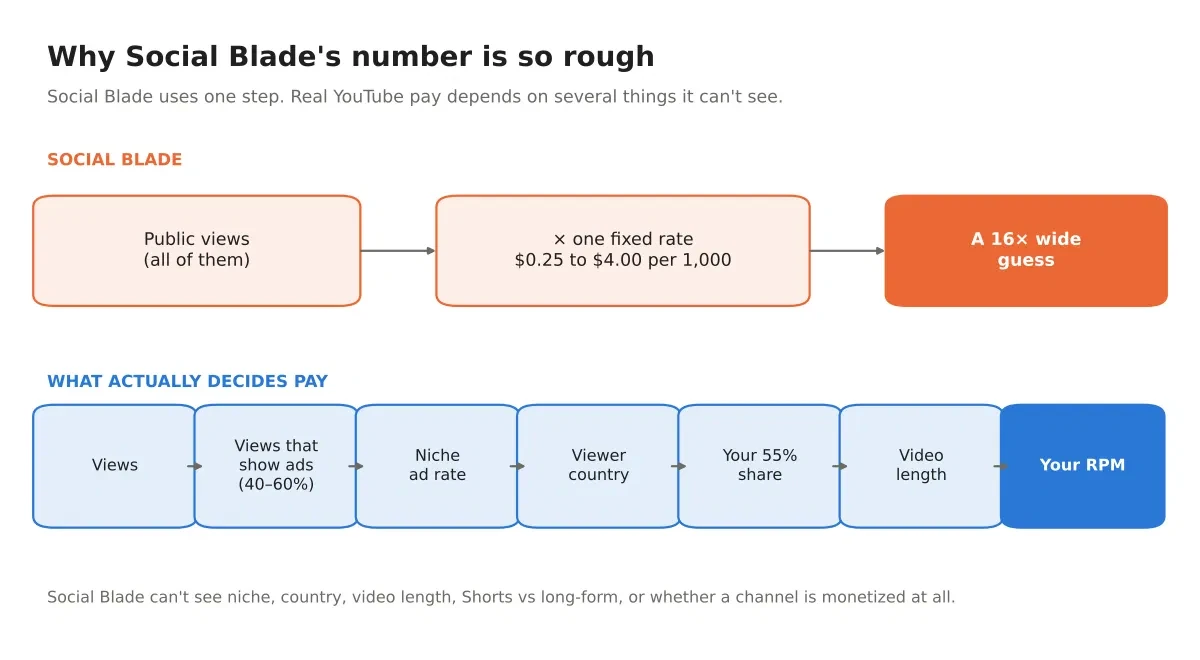
You can change the rate yourself in Social Blade’s settings, which helps if you already know your real RPM. But the default applies the same rate to a finance channel in New York and a kids’ channel in a low-CPM country.
What Social Blade can’t see
Public data stops well short of what decides your pay. Social Blade has no way to know:
- Your niche. Advertiser demand varies hugely. Our methodology puts technology at $8–$22 CPM and gaming at $2–$8.
- Your audience country. The same video earns less with viewers outside the top ad markets; we count Canada at 0.85× the US rate.
- Your video length. Videos of 8 minutes or longer can carry mid-roll ads, which raises earnings per view.
- Shorts versus long-form. Shorts pay from a shared pool at a fraction of long-form rates.
- Whether the channel is monetized at all. A channel outside the Partner Program earns nothing, even while ads play on its videos — see how to check if a channel is monetized.
- Limited ads. Content judged unsuitable for some advertisers earns less, and made-for-kids videos don’t carry personalized ads.
- Everything that isn’t ads. Memberships, Super Thanks, Premium revenue and sponsorships don’t appear in public data at all.
- The season. January pays far less than December for the same views.
One more small thing: Social Blade’s view numbers come from snapshots, so they can lag YouTube’s own figures by a day or so (Social Blade help). For trends that’s fine. For a daily earnings figure it adds one more layer of approximation.
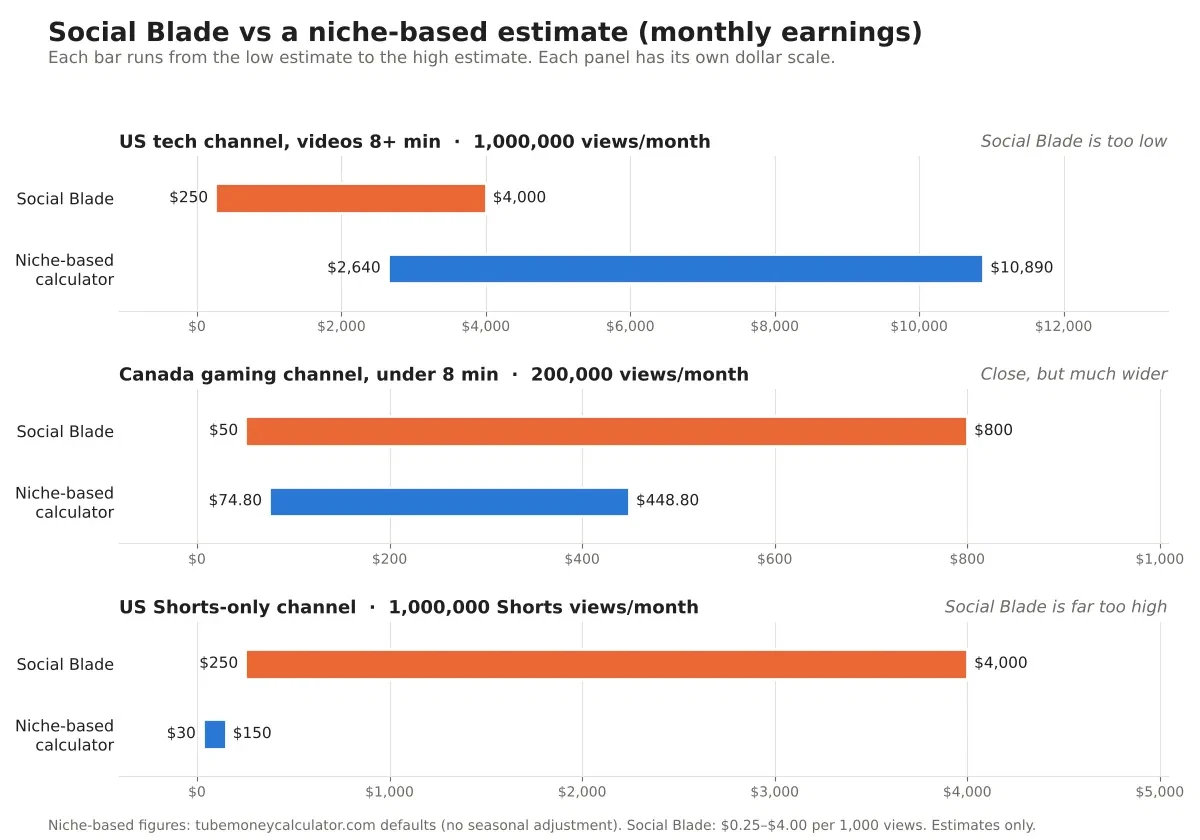
Worked example 1: a US tech channel (Social Blade is too low)
A technology channel with a mostly US audience, videos 8 minutes or longer, 1,000,000 views a month. Using our methodology:
- Low RPM: $8 CPM × 1.00 (US) × 40% monetized views × 55% creator share × 1.5 (mid-roll boost) = $2.64 per 1,000 views
- High RPM: $22 × 1.00 × 60% × 55% × 1.5 = $10.89 per 1,000 views
- Monthly estimate: $2,640 to $10,890
Social Blade for the same channel: $250 to $4,000.
Its entire range sits below our low estimate at one end and below our high estimate at the other. For a well-monetized channel in a high-paying niche, Social Blade’s $4.00 ceiling is simply too low a cap.
Worked example 2: a Canadian gaming channel (close, but far too wide)
A gaming channel, mostly Canadian audience, videos under 8 minutes, 200,000 views a month:
- Low RPM: $2 × 0.85 (Canada) × 40% × 55% = $0.374 per 1,000 views
- High RPM: $8 × 0.85 × 60% × 55% = $2.244 per 1,000 views
- Monthly estimate: $74.80 to $448.80
Social Blade: $50 to $800.
Here it’s in the right area. The problem is the width: Social Blade’s range is about 16× top to bottom, ours about 6×, because ours already knows the niche and the country. A range you can act on beats a range that technically contains the answer.
Worked example 3: a US Shorts channel (Social Blade is far too high)
A Shorts-only channel with 1,000,000 Shorts views a month in the US. Shorts pay from the Shorts Creator Pool, where the creator share is 45% (YouTube Help), and our methodology puts the resulting rate at $0.03–$0.15 per 1,000 views:
- Monthly estimate: $30 to $150
Social Blade: $250 to $4,000.
Its low end is over eight times our high end. This is where a public estimate misleads the most, because Social Blade can’t tell a Short from a 20-minute documentary.
It gets starker in 2027. From February 1, 2027, a channel needs 10 million qualified Shorts views in the last 90 days to share in Shorts revenue at all. A channel at 1 million Shorts views a month — 3 million per 90 days — would earn $0 from the Shorts pool while still being a Partner Program member earning on long-form. Social Blade would carry on showing hundreds or thousands of dollars. We cover that rule in YouTube’s 10 million Shorts views rule.
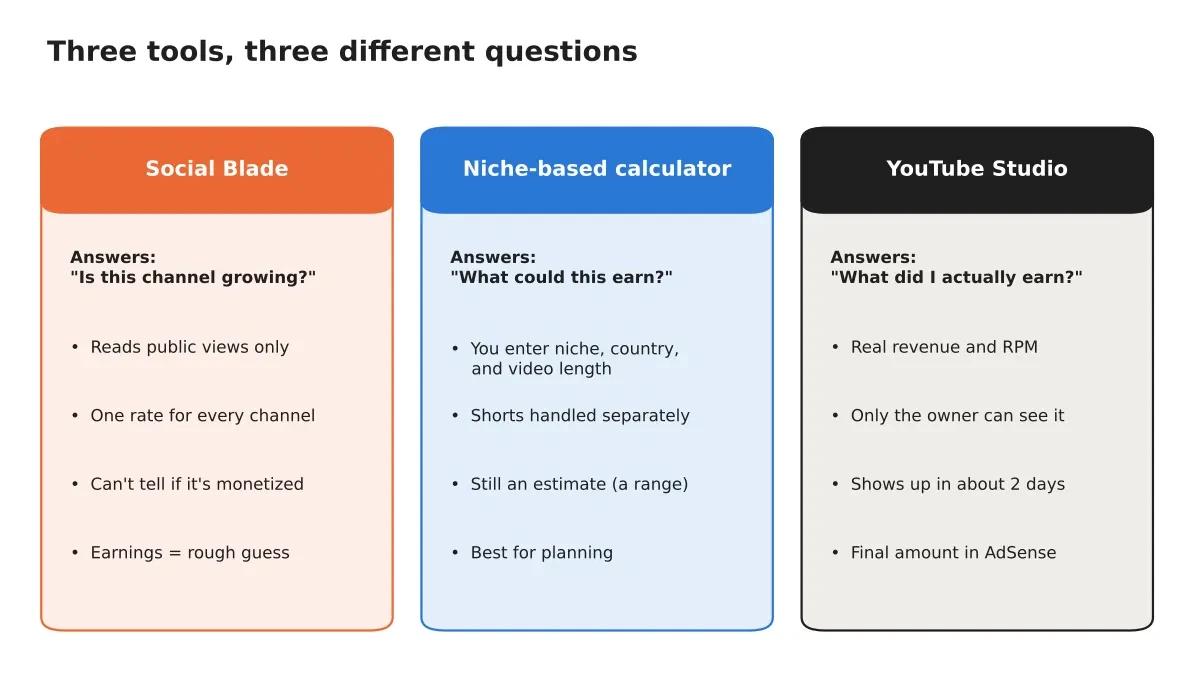
Social Blade vs a niche calculator vs YouTube Studio
| Social Blade | A niche-based calculator | YouTube Studio | |
|---|---|---|---|
| What it reads | Public views and subscribers | The niche, country and video length you enter | Your channel’s real data |
| Earnings method | One fixed $0.25–$4.00 rate | Niche CPM, country, ad-serving rate, 55% share, length | Actual revenue YouTube recorded |
| Knows if you’re monetized | No | No (you tell it) | Yes |
| Handles Shorts separately | No | Yes | Yes |
| Who can see it | Anyone | Anyone | The channel owner only |
| Best used for | Subscriber and view trends | Planning and “what if” questions | What you actually earned |
How to get a more accurate estimate (5 steps)
- Open YouTube Studio → Analytics → Revenue. This is the only source of real numbers for your channel. Revenue takes about two days to appear, and the finalized amount in AdSense for YouTube can differ slightly (YouTube Help).
- Write down your RPM for the last 28 days. RPM is your earnings per 1,000 views after YouTube’s share, and it includes ads, memberships, Premium and Supers (YouTube Help). If the term is new, read YouTube RPM explained.
- Note your audience’s top countries from the Audience tab, and whether most views come from Shorts or long videos.
- Put those details into a niche-based estimate. Enter your views, niche, country and video length in the calculator and compare the range it gives with your actual RPM.
- Repeat monthly. Earnings move with the season, so one month tells you much less than three.
For a channel you don’t own, steps 1 to 3 aren’t available — which is exactly why every public estimate is a guess.
Can you check another channel’s real income by name?
No. Earnings are visible only to the channel owner, in YouTube Studio and AdSense. Every tool that offers income “by channel name” is inferring it from public view counts, using some version of the method described above.
That matters most in sponsorship talks. If you’re quoting a creator’s earnings from a public tool, you’re quoting an estimate of an estimate. Ask the creator for a media kit instead, or work from what you’d pay for the audience rather than what you think YouTube pays them.
FAQ
Is Social Blade’s view count accurate?
Generally yes, and it’s the part worth using. Numbers come from periodic snapshots, so they can lag a day behind YouTube’s own figures, which is fine for trends.
Why does Social Blade show earnings for a channel that isn’t monetized?
Because it can’t tell. It multiplies views by a rate regardless of Partner Program status. YouTube can run ads on a non-partner channel’s videos and keep the revenue, so ads appearing proves nothing either.
Is TubeMoneyCalculator more accurate than Social Blade?
For earnings, it should be closer, because it accounts for niche, audience country, video length and Shorts rather than one flat rate. But it’s still an estimate built on published ad-rate ranges, not your account. Our methodology shows every number and assumption, including where our figures are our own judgment. YouTube Studio remains the only truth.
Can I change Social Blade’s RPM?
Yes. Its settings let you set your own rate. If you know your real RPM from Studio, entering it makes the estimate far more useful — though at that point you already have the number you were looking for.
The bottom line
Social Blade’s earnings figure answers “roughly what size is this channel’s income?” with a very wide margin. It cannot answer “what does this channel earn?” because the facts that decide the answer aren’t public.
Use Social Blade for subscriber and view trends. Use a niche-based estimate for planning. Use YouTube Studio for truth.
Your next step: open the YouTube Money Calculator, enter your real monthly views with your niche, audience country and video length, and compare the range with your Studio RPM. If you want a worked walkthrough at scale, see how much YouTube pays for 1 million views.