You finally got accepted into the YouTube Partner Program. YouTube Studio shows $14 in estimated revenue. A month goes by. Then another. Your bank account still shows nothing, and you start to wonder if something is broken.
Nothing is broken. If you’ve been asking how YouTubers actually get paid, the answer is that YouTube’s payment system just runs on a slow, fixed monthly schedule with a few gates you have to pass first. Once you see the whole timeline, the waiting makes sense, and you can plan for it.
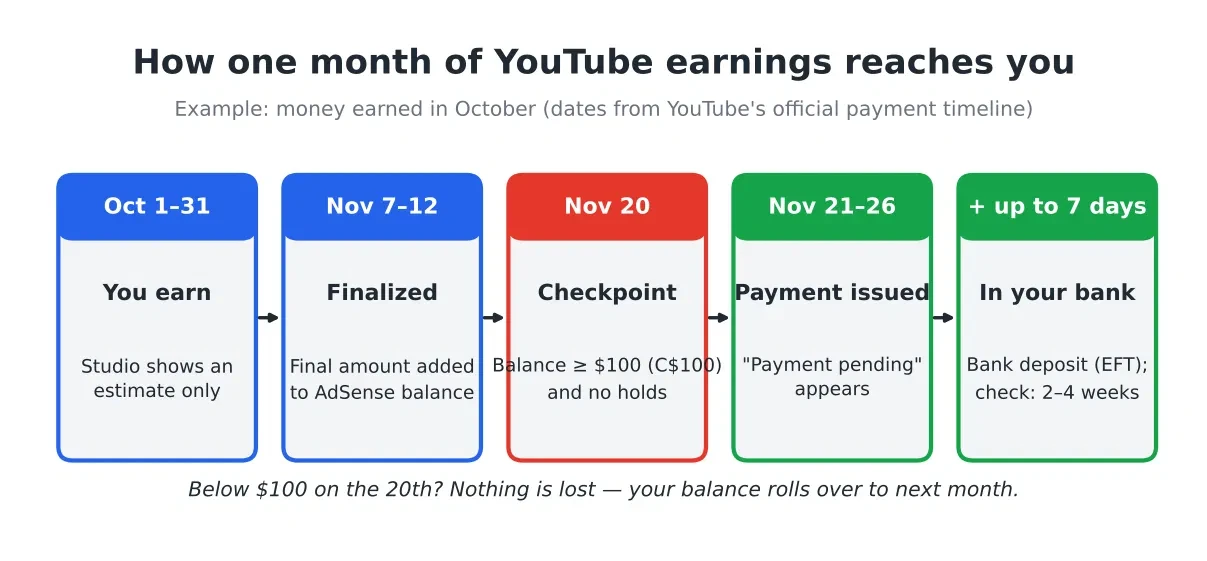
The short answer: YouTubers get paid once a month through AdSense for YouTube. Each month’s earnings are finalized between the 7th and 12th of the next month. If your balance is at least $100 (or C$100 in Canada) on the 20th and you have no holds, YouTube sends the payment between the 21st and 26th. So money you earn in October usually arrives in late November at the earliest, and smaller channels often wait several months to reach the first $100.
Where YouTube money actually comes from
Before the timeline, a quick word on what you are being paid for. Most of a new partner’s money comes from ads. For long-form videos, YouTube pays creators 55% of the net ad revenue from ads shown on their public videos. For Shorts, creators get 45% of the revenue assigned to them from the Shorts pool.
Other money, like YouTube Premium revenue, channel memberships, Super Chat and Super Thanks, all flows into the same place: your AdSense for YouTube account. You do not get paid separately for each one. Everything is added up and paid together once a month.
If you want to know how views turn into dollars in the first place, our guide on YouTube RPM explained covers that. This article is about the next question: once you have earned the money, how and when does it reach you?
The 4 gates between your views and your bank account
YouTube’s official page on how to get paid lists four things you must do. Think of them as gates. Your money moves forward only when each one is open.
Gate 1: Your personal info is correct
Your payment name and address in AdSense for YouTube must be right. The name should match your bank account. This sounds small, but a typo here is one of the most common reasons a first payment gets stuck.
Gate 2: You verify your address with a PIN ($10)
When your earnings reach the verification threshold of $10, Google asks you to verify your identity. Then it mails a PIN (a short code) to your payment address by regular post. YouTube says this can take 3 to 4 weeks. You type the PIN into your AdSense for YouTube account. In some places you can verify online instead.
Keep an eye on your mailbox. The letter looks plain and is easy to throw away by mistake.
Gate 3: You add tax info and a payment method ($10)
Every Partner Program member must submit tax info, no matter where they live. In the US, that means a W-9 form. In Canada, it means a form for non-US creators (inside AdSense, you answer questions and the right form is chosen for you).
At the payment method selection threshold of $10 (C$10 in Canada), you choose how to get paid. Options depend on your address. YouTube lists direct bank deposit (EFT), Hyperwallet, wire transfer and check. Direct deposit is the most common choice in the US and Canada.
Gate 4: Your balance reaches $100 by the 20th
The payment threshold is $100 in US dollars, or C$100 if your account uses Canadian dollars, according to YouTube’s threshold page. If your balance is below that, nothing is lost. It rolls over and keeps growing until it crosses the line.
| Threshold | US account | Canadian account | What happens |
|---|---|---|---|
| Verification | $10 | $10 equivalent | You verify identity; PIN mailed (3–4 weeks) |
| Payment method | $10 | C$10 | You can choose bank deposit, check, etc. |
| Payment | $100 | C$100 | You get paid that month (if no holds) |
The monthly payment calendar, step by step
Here is what happens to one month of earnings, using October as an example. These dates come from YouTube’s payment timeline page and its payment process page.
- October 1–31: You earn. YouTube Studio shows estimated revenue. It is only an estimate and can still change.
- November 7–12: October is finalized. YouTube adjusts the estimate (for example, for invalid traffic or copyright claims) and adds the final amount to your AdSense for YouTube balance.
- November 20: Checkpoint day. Your balance must be at least $100, and any changes to your payment info or holds must be fixed by this date. Changes made after the 20th wait until the next month.
- November 21–26: Payment is issued. You see a “Payment pending” line. If the 21st falls on a weekend or holiday, it may move to the next business day.
- After that: The money travels. Bank deposit (EFT) can take up to 7 business days. A check can take 2 to 4 weeks by mail. A wire can take up to 15 business days.
So the fastest you can see October money in a US bank account is late November, and sometimes early December.
One more thing many people miss: YouTube says the final number is only visible in AdSense for YouTube, not in Studio. Studio’s estimate can move up or down after the month ends. If Studio says $112 and AdSense says $104, the AdSense number is the one that gets paid.
Worked example 1: A US cooking channel waiting for its first $100
Let’s say you run a small US food and cooking channel. You join the Partner Program in October. Your videos are under 8 minutes, and you get about 15,000 views a month, mostly from the US.
Using the numbers on our methodology page:
- Low RPM: $4 CPM × 1.00 (US) × 40% monetized views × 55% creator share = $0.88 per 1,000 views
- High RPM: $12 CPM × 1.00 × 60% × 55% = $3.96 per 1,000 views
- Monthly earnings: 15,000 ÷ 1,000 × RPM = $13.20 to $59.40 in an average month
Ad prices also change with the seasons. Holiday months pay more, and January pays less. With the calculator’s seasonal option turned on (October 1.10×, November 1.25×, December 1.35×, January 0.75×, and so on), here is how the balance builds:
| Month earned | Low estimate | Running total (low) | High estimate | Running total (high) |
|---|---|---|---|---|
| October | $14.52 | $14.52 | $65.34 | $65.34 |
| November | $16.50 | $31.02 | $74.25 | $139.59 ✔ |
| December | $17.82 | $48.84 | $80.19 | — |
| January | $9.90 | $58.74 | $44.55 | — |
| February | $10.82 | $69.56 | $48.71 | — |
| March | $12.14 | $81.70 | $54.65 | — |
| April | $12.54 | $94.24 | $56.43 | — |
| May | $13.20 | $107.44 ✔ | $59.40 | — |
What this means in real life:
- On the high side, you cross $100 with November’s earnings. Those are finalized in early December, and you get paid December 21–26.
- On the low side, you don’t cross $100 until May’s earnings. Those are finalized in early June, and you get paid June 21–26.
Same channel, same views, and the first payday could be anywhere from 2 to 8 months after joining. That is why so many new partners feel lost. The good news is that you passed the $10 verification gate in your very first month, so your PIN letter has plenty of time to arrive.
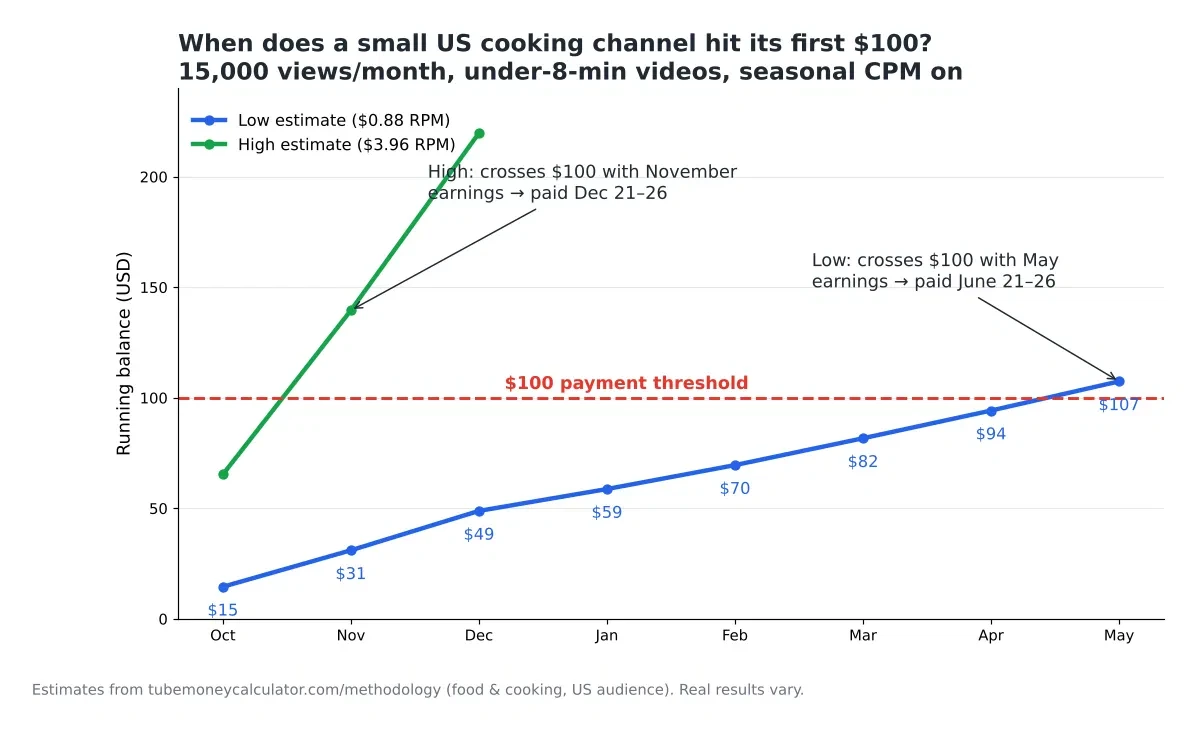
You can run your own version of this table on the Earnings Estimator. Enter your monthly views, niche and video length, tick “Adjust for seasonal CPM,” and pick each month.
Worked example 2: A Canadian gaming channel and US tax withholding
This is the part that surprises Canadian creators the most. Google withholds US tax on the part of your YouTube earnings that comes from US viewers. That includes ad views, YouTube Premium, Super Chat, Super Stickers, Super Thanks and memberships.
How much is withheld depends on whether you gave Google your tax info:
- US creators with valid tax info (W-9): Google does not withhold tax. You report the income yourself when you file.
- Non-US creators with valid tax info: 0% to 30% of US-viewer earnings, depending on whether your country has a tax treaty with the US and whether you claim it.
- No tax info at all (individual account): Google may withhold 24% of your total earnings worldwide, not just the US part.
Now the numbers. Say you are a Canadian gaming creator. You post videos longer than 8 minutes and get 60,000 views a month. In YouTube Analytics, you see that 60% of views come from the US and 40% from Canada.
Step 1: Work out the RPM for each country.
- US gaming RPM: $2 × 1.00 × 40% × 55% × 1.5 (8+ min boost) = $0.66 low; $8 × 1.00 × 60% × 55% × 1.5 = $3.96 high
- Canada gaming RPM: same math × 0.85 = $0.561 low; $3.366 high
Step 2: Work out the earnings for each group of viewers.
- US viewers: 36,000 views → $23.76 to $142.56
- Canadian viewers: 24,000 views → $13.46 to $80.78
- Total: $37.22 to $223.34 a month
Step 3: See what different tax situations do.
| Your situation | What may be withheld | Low month | High month |
|---|---|---|---|
| Tax info filed, 0% treaty rate | 0% of US part | $0 | $0 |
| Tax info filed, no treaty claimed | 30% of US part | $7.13 | $42.77 |
| No tax info at all | 24% of everything | $8.93 | $53.60 |
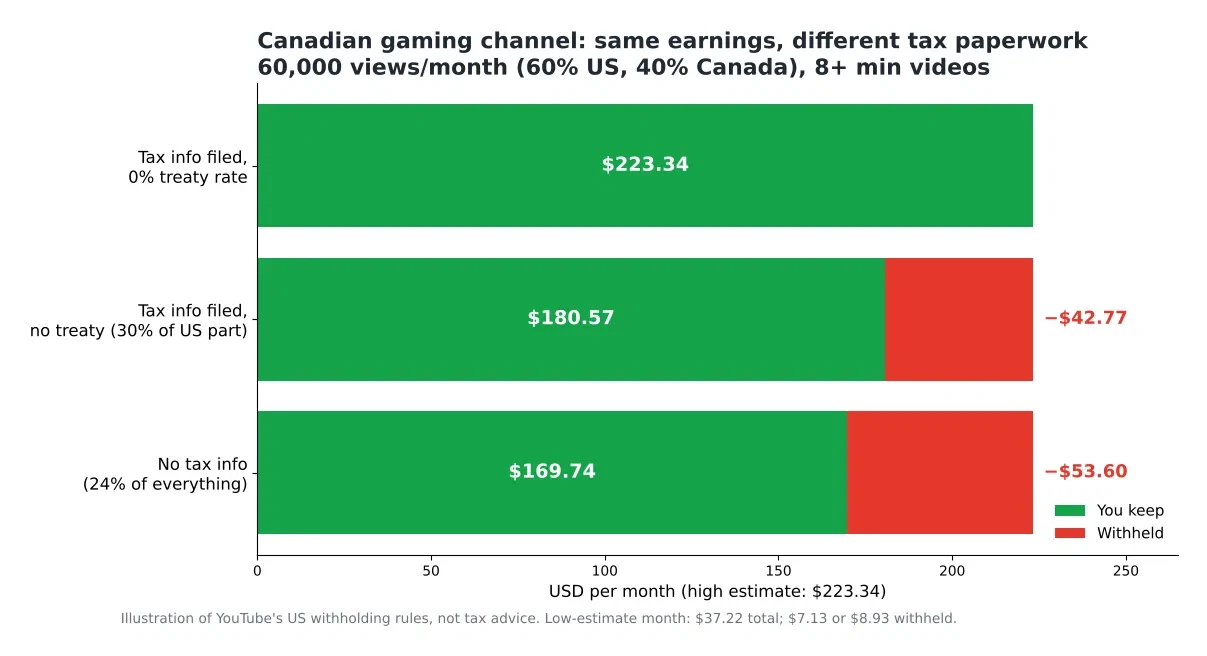
The lesson is simple: fill out your tax info as soon as AdSense asks. Leaving it blank can cost you the most. Which treaty rate applies to you is a tax question, not a YouTube question. The form inside AdSense will ask, and YouTube itself says to talk to a tax professional if you’re unsure. I’m not a tax advisor either, so treat the table as an illustration of how the rules work, not advice for your situation.
Two more dates worth writing down:
- Submit or update tax info by December 10 each year. Fixes made after that may not get you a refund for that year.
- Tax forms expire at the end of the third full calendar year after you sign them, so you’ll need to resubmit now and then.
Why your first payment might be late (and how to fix it)
If your balance passed $100 but no money came, check these in order:
- A payment hold. Log in to AdSense for YouTube and look for a red or yellow banner. Holds for a missing PIN, tax info or payment method stop the payment.
- The 20th cutoff. If you fixed something on the 22nd, the payment waits a full month.
- Two separate balances. If you also use AdSense on a website, YouTube says your AdSense and YouTube payment accounts are separate, and each must reach the threshold on its own. $60 from your blog plus $60 from YouTube does not equal one $120 payment.
- Finalized earnings came in lower. Remember, Studio shows estimates. If adjustments pulled your final balance from $103 down to $97, it rolls over to next month.
- Bank details. A name that doesn’t match your bank account, or a wrong account number, can bounce the deposit.
Also note that YouTube says it cannot pay early, for any reason. If you are waiting, the only fix is to make sure every gate is open before the 20th.
Planning around YouTube’s slow pay
Because of the 2-month gap, it helps to think of YouTube money as “last month’s paycheck, paid late.” A few practical habits:
- Budget with the low estimate, not the high one.
- Expect January’s pay (which arrives in late February) to be smaller. Ad prices drop after the holidays. Our calculator’s seasonal option uses 0.75× for January.
- Check the “Payments” page in AdSense for YouTube around the 13th of each month. By then the finalized number is in.
- Use our Views to Money tool to see how many views you’d need to reach $100 in a single month, so you know when you’ll start getting paid monthly instead of every few months.
If you haven’t joined the Partner Program yet, start with how many views you need to make money on YouTube, which covers the entry rules and the $100 gate together.
FAQ
How often do YouTubers get paid?
Once a month, between the 21st and 26th, as long as your balance is at least $100 (C$100) and there are no holds. If you are below the threshold, your balance carries over.
Does YouTube pay you directly, or through AdSense?
Through AdSense for YouTube. It is a separate payments account linked to your channel. YouTube Studio only shows estimates; AdSense for YouTube shows the final amount and sends the money.
Can I get my YouTube money before I reach $100?
No. YouTube says it cannot issue payments outside the normal schedule. Your earnings are safe and keep adding up until they cross the threshold.
Do US creators pay tax on YouTube income?
Yes, but Google doesn’t withhold it if you submitted a valid W-9. You report the income on your own tax return. US creators typically get a Form 1099-MISC by early March. Check with a tax professional for your situation.
Why does Canada lose money to US tax?
Google must withhold US tax on earnings from US viewers when the creator lives outside the US. The rate depends on your tax info and any treaty you claim. Earnings from Canadian viewers are not part of this US withholding.
Your next step
Open YouTube Studio, go to Earn, and click into your AdSense for YouTube account. Check three things today: your PIN is verified, your tax info is submitted, and your payment method is set. Then put your monthly views into the TubeMoneyCalculator Earnings Estimator with the seasonal option on, and you’ll have a realistic idea of which month your first $100 will land.
All earnings in this article are estimates based on the calculator’s published method. Your real RPM, audience mix and finalized earnings will differ.