How many views do you need to make money on YouTube? If you have a video sitting at 30,000 views and a balance of $0.00, you have probably typed that exact question into Google. It feels unfair. The views are real. People watched. So where is the money?
New creators run into this all the time. One video takes off, the view counter climbs, and nothing shows up in YouTube Studio. Others get accepted, earn $40 in their first month, and then wonder why no payment arrives.
Both problems have the same cause. Views are not the thing YouTube counts when it decides to pay you.
The short answer
There’s no view count that switches on earnings. To earn ad money you first need 1,000 subscribers plus 4,000 hours of watch time in the last 12 months, and then your earnings must reach $100 before YouTube sends a payment. For a US audience watching videos of 8 minutes or more, that first $100 takes roughly 4,500 to 150,000 views, depending on your niche.
That’s a wide range, so the rest of this article shows you how to narrow it down for your own channel.
Why views alone don’t make you money
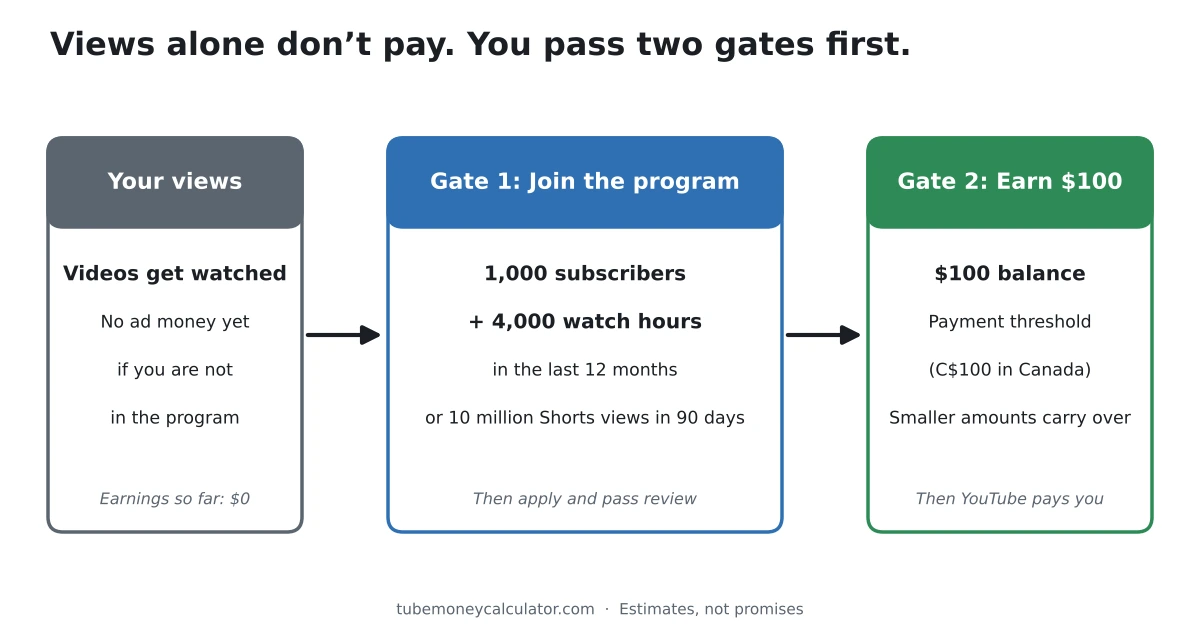
Think of YouTube money as having two gates. You have to pass both before a dollar reaches your bank account.
- Gate 1 is getting into the YouTube Partner Program. Until you’re in, your videos earn you nothing from ads, no matter how many views they get.
- Gate 2 is earning enough to be paid. Once you’re in, your earnings build up until they reach the payment threshold.
A video with a million views on a channel that hasn’t passed Gate 1 earns the creator $0 from ads. That’s the answer to most “I have views but no money” questions.
Gate 1: getting into the YouTube Partner Program
YouTube’s Partner Program eligibility page lists two ways to qualify for ad revenue. You need one of them:
- 1,000 subscribers and 4,000 public watch hours in the last 12 months, or
- 1,000 subscribers and 10 million public Shorts views in the last 90 days.
Notice what’s missing from path 1. There’s no view number in it at all. YouTube counts hours watched on your long videos, not clicks. Time people spend watching your Shorts in the Shorts feed doesn’t count toward the 4,000 hours.
You also need to follow YouTube’s monetization policies, have no active Community Guidelines strikes, turn on 2-Step Verification, and link an AdSense for YouTube account. After you apply, YouTube reviews your channel. The same page says a decision typically takes about a month, and answers “no” to whether meeting the threshold means automatic acceptance: every channel goes through a standard review.
There’s also an earlier tier. With 500 subscribers, 3 public uploads in the last 90 days, and either 3,000 watch hours or 3 million Shorts views, you can unlock fan funding such as channel memberships and Super Thanks. YouTube’s expanded Partner Program page is clear that ad revenue sharing only starts at the higher tier.
How many views is 4,000 watch hours?
This is the part you can turn into a view number. 4,000 hours is 240,000 minutes. Divide that by how long people watch each video on average.
Views needed = 240,000 ÷ your average view duration in minutes
| Average view duration | Views that equal 4,000 hours |
|---|---|
| 2 minutes | 120,000 |
| 3 minutes | 80,000 |
| 4 minutes | 60,000 |
| 6 minutes | 40,000 |
| 10 minutes | 24,000 |
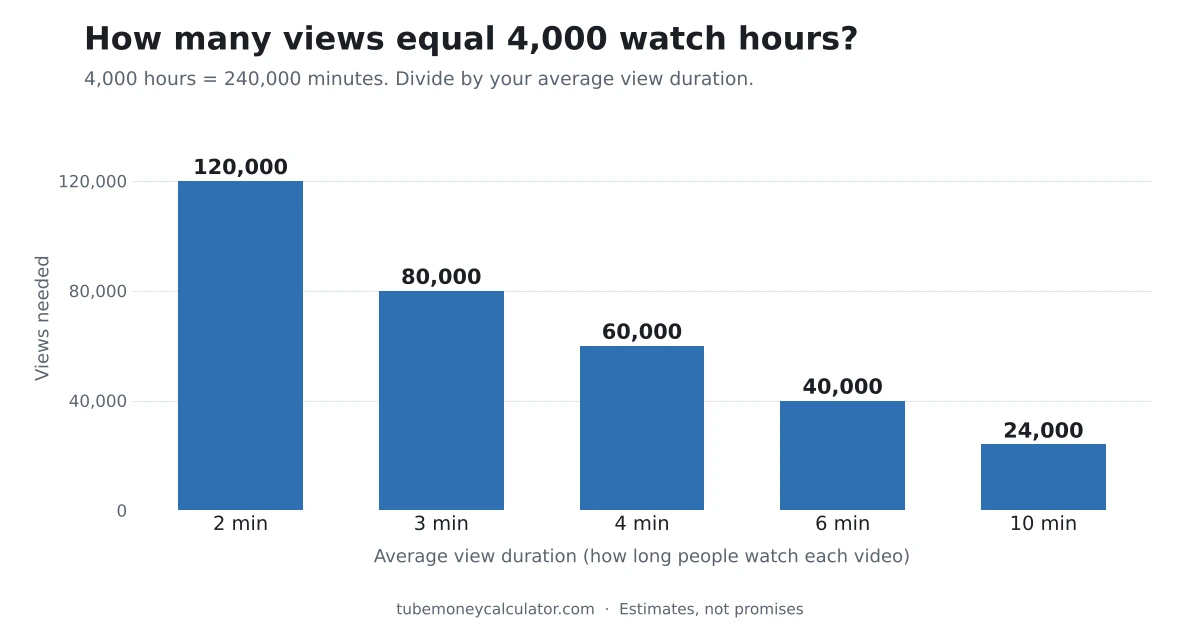
You can find your own average view duration in YouTube Studio. Open Analytics, then the Overview or Engagement tab. If your number is 3 minutes, you need about 80,000 views on long videos in a 12-month window. If you can hold people for 6 minutes, you need half as many.
This is why a channel with fewer views but longer watch time can get monetised sooner than a channel with one short viral hit.
Gate 2: earning your first $100
Once you’re in the program, ads start earning on your videos. YouTube keeps 45% of long-video ad revenue and pays you 55%, as set out on its partner earnings page.
But you aren’t paid right away. Google’s payment threshold page sets the minimum at $100 for US dollar accounts and C$100 for Canadian dollar accounts. If you earn $40 this month, it carries over. Nothing is lost. You’re paid once the running total crosses $100. YouTube’s payment process page sets out the monthly rhythm: earnings are finalised and posted between the 7th and 12th, and payments are issued between the 21st and 26th.
So the practical question becomes: how many views does it take to earn $100?
The formula
The number you need is your RPM. RPM means revenue per 1,000 views. It’s what you actually keep after YouTube’s cut, averaged over all your views, including the ones that showed no ad. Our post on YouTube RPM explained covers it in full.
Views needed = income goal ÷ RPM × 1,000
If your RPM is $4, then $100 ÷ $4 × 1,000 = 25,000 views. If your RPM is $1, the same $100 takes 100,000 views.
Views needed by niche
The table below uses the ranges from our methodology page. It assumes a US audience, videos of 8 minutes or more, and no seasonal adjustment. The low end of each range is a good month with high ad rates. The high end is a weak one.
| Niche | Estimated RPM | Views for $100 | Views for $1,000 |
|---|---|---|---|
| Finance & investing | $4.95–$22.28 | 4,500–20,200 | 44,900–202,000 |
| Technology | $2.64–$10.89 | 9,200–37,900 | 91,800–378,800 |
| Health & fitness | $2.31–$8.91 | 11,200–43,300 | 112,200–432,900 |
| Food & cooking | $1.32–$5.94 | 16,800–75,800 | 168,400–757,600 |
| Vlogs & lifestyle | $0.99–$3.96 | 25,300–101,000 | 252,500–1,010,100 |
| Gaming | $0.66–$3.96 | 25,300–151,500 | 252,500–1,515,200 |
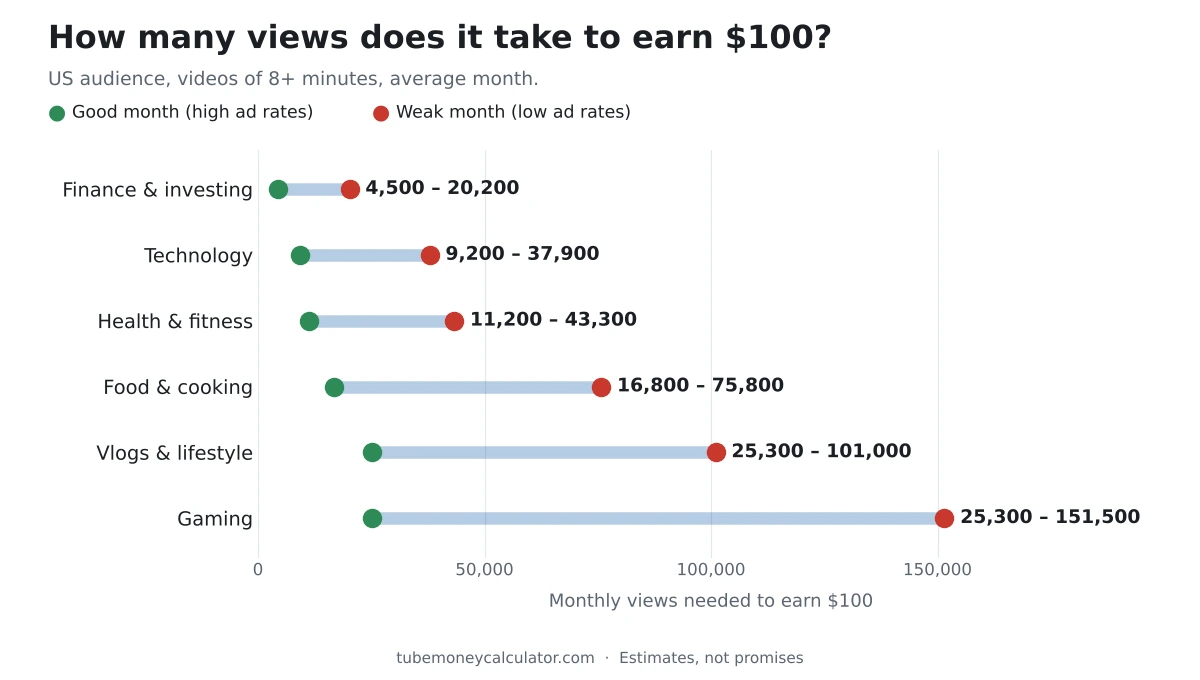
These are estimates, not promises. Your real RPM depends on who watches, what you talk about, and which advertisers want that audience this month.
How to find your own number in 4 steps
- If you’re already monetised, use your real RPM. In YouTube Studio, open Analytics and click the Revenue tab. Your RPM is shown there. Use the last 28 or 90 days, since a single day jumps around.
- If you’re not monetised yet, estimate it. Open the Goal Calculator and pick your niche, your main audience country, and your video length.
- Enter your monthly income goal. Start with $100. It’s the first number that matters.
- Read the range, not one number. Plan around the higher view count. If the good-month number happens instead, that’s a nice surprise.
Worked example 1: a US gaming channel chasing its first $100
Picture a gaming channel with a mostly US audience. The videos run about 6 minutes, and people watch for 3 minutes on average.
Gate 1. 240,000 ÷ 3 = 80,000 views on long videos within 12 months, plus 1,000 subscribers.
Gate 2. Here’s the RPM maths, step by step:
- Gaming ad rates (CPM): $2.00–$8.00
- US audience (× 1.00): $2.00–$8.00
- Only 40%–60% of views show an ad: $0.80–$4.80
- Creator keeps 55%: $0.44–$2.64
- Videos under 8 minutes get no mid-roll boost: RPM stays $0.44–$2.64
Now the views for $100:
- Good month: $100 ÷ $2.64 × 1,000 = about 37,900 views
- Weak month: $100 ÷ $0.44 × 1,000 = about 227,300 views
So this channel needs somewhere between 37,900 and 227,300 monetised-era views to earn its first $100. Views from before the channel was accepted don’t earn anything.
Worked example 2: a Canadian DIY channel aiming for $1,000 a month
Now take a home DIY channel based in Ontario. Most viewers are Canadian, and the videos run about 10 minutes.
- DIY & crafts ad rates (CPM): $4.00–$11.00
- Canadian audience (× 0.85): $3.40–$9.35
- 40%–60% of views show an ad: $1.36–$5.61
- Creator keeps 55%: $0.748–$3.086
- Videos of 8+ minutes can carry mid-roll ads (× 1.5): RPM of $1.122–$4.628 (three decimals, so the division below matches the calculator)
Views for $1,000 a month:
- Good month: $1,000 ÷ $4.628 × 1,000 = about 216,100 views
- Weak month: $1,000 ÷ $1.122 × 1,000 = about 891,300 views
One detail matters here for Canadian creators. The country setting is about where your viewers are, not where you live. If that same channel had a mostly US audience, the estimate drops to about 183,700–757,600 views. You can check your own audience split in YouTube Studio under Analytics, then Audience.
Three things that change your number
1. Shorts need far more views
Shorts are paid differently. Ad money from the Shorts feed goes into a shared pool, and creators keep 45% of the part allocated to them, according to YouTube’s Shorts monetization policies.
Our calculator uses a US Shorts RPM of $0.03–$0.15. At those rates, $100 takes roughly 667,000 to 3.3 million Shorts views. Shorts are great for getting discovered. They’re a slow way to reach $100.
2. Video length
Videos of 8 minutes or more can carry mid-roll ads. Our estimate applies a 1.5× boost for them. That means the same goal needs about one third fewer views. Take the gaming channel above: at 8+ minutes, the range for $100 drops from 37,900–227,300 to about 25,300–151,500.
Don’t pad a video just to hit 8 minutes, though. If people click away early, you lose watch time, and watch time is what gets you through Gate 1.
3. Time of year
Advertisers spend less in January and more before the holidays. Our seasonal option uses 0.75× for January and 1.35× for December. For the gaming channel’s $100:
| Month | Views needed for $100 |
|---|---|
| Average month | 37,900–227,300 |
| January (0.75×) | 50,500–303,000 |
| December (1.35×) | 28,100–168,400 |
If your income drops in January while your views hold steady, you did nothing wrong. Our post on how much money you get per view explains the seasonal swing in more detail.
Frequently asked questions
Does YouTube pay you for 1,000 views?
Not by itself. If you’re not in the Partner Program, 1,000 views earn $0 from ads. If you are in, 1,000 views earn your RPM. In our estimates that runs from under $1 for gaming to over $20 for finance in a strong month.
Do I get paid for views I got before I was monetised?
No. Ad revenue sharing starts once you’re accepted and agree to the monetisation terms. Your older videos can earn from new views after that date, which is one good reason to keep making videos people search for year after year.
Do Shorts views count toward the 4,000 watch hours?
No. YouTube’s eligibility page says watch time from the Shorts feed doesn’t count toward the 4,000 hours. Shorts have their own path: 1,000 subscribers and 10 million public Shorts views in 90 days.
I have 1,000 subscribers. Why am I not earning?
Subscribers are only half of Gate 1. You also need the 4,000 watch hours, then you have to apply and pass review. YouTube doesn’t pay for subscribers themselves. They help because they tend to watch more of what you post.
How long until my first payment arrives?
It depends on how fast you reach $100. Once your balance crosses the threshold, payment is issued between the 21st and 26th of the following month. A small channel earning $25 a month would wait about four months for its first payout.
Your next step
Do one thing today. Open YouTube Studio and write down two numbers: your watch hours for the last 365 days and your average view duration. Divide 240,000 by your average view duration, and you’ll know how many views stand between you and Gate 1.
Then open the YouTube Money Calculator, choose the Goal Calculator, and enter $100 with your niche, audience country, and video length. That gives you your Gate 2 number. If you want to see how each step of the estimate is built, the how it works page walks through it.
Two numbers, both specific to your channel. That’s a much better target than “get more views.”
All earnings figures in this article are estimates based on the ranges on our methodology page. They are not a guarantee of income. YouTube’s rules can change, so check the linked official pages for the current requirements.